> ## Documentation Index
> Fetch the complete documentation index at: https://studio.assembly.com/docs/llms.txt
> Use this file to discover all available pages before exploring further.
# Overview
> How webhooks deliver event payloads, how to respond, and how to verify their signatures
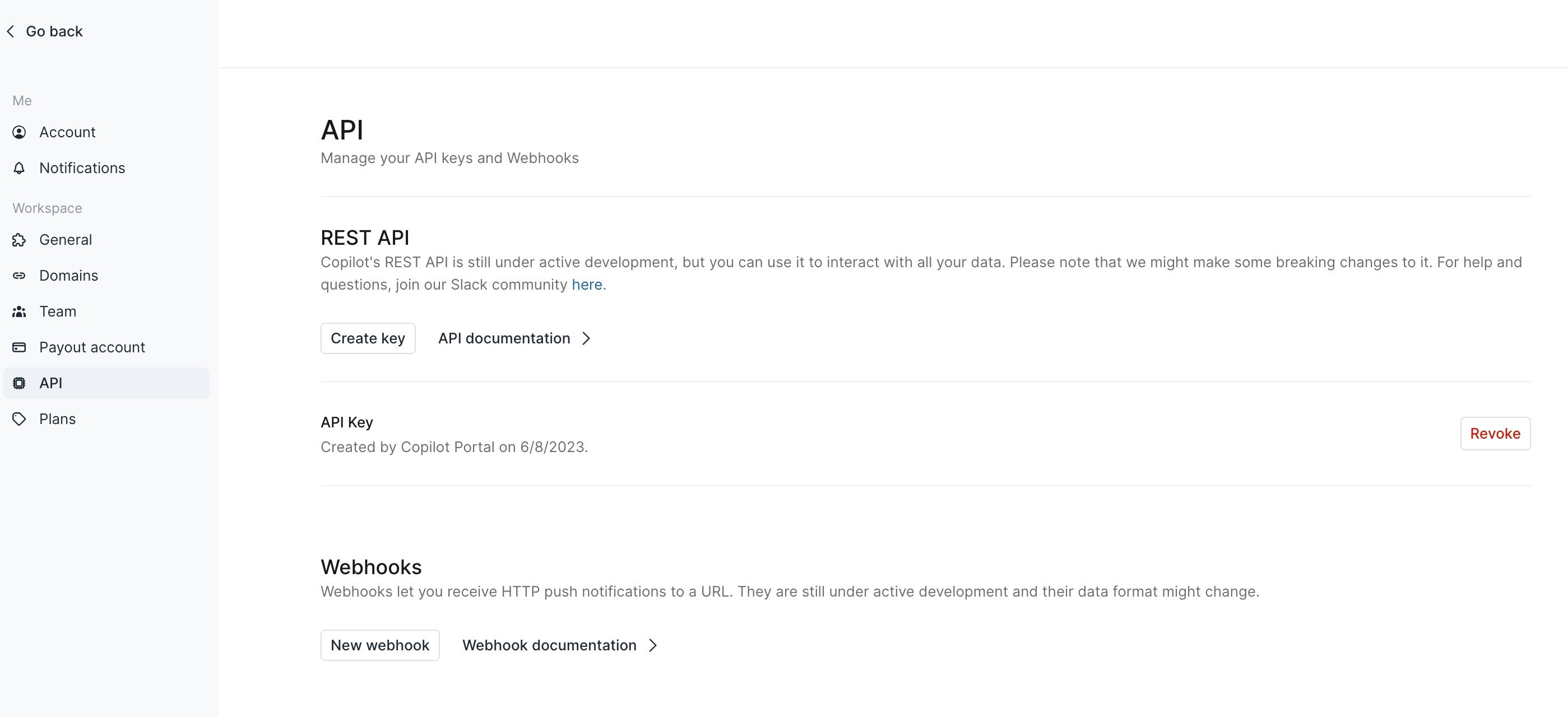
Webhooks can be created on the [Settings > API page](https://app.assembly.com/settings/api).
 ## Payload
The payload for a webhook is an Event object with the following properties:
**eventType** `string`
The event type that triggered this webhook.
**data** `map`
A resource object associated with this webhook event.
**previousAttributes** `map`
For certain `*.updated` events, the event payload includes a `previousAttributes` map that lets you see what has changed about a resource. To learn more about the events that include `previousAttributes` see the Event details section below.
### Example webhook response
```json Example Webhook Response theme={null}
{
"eventType": "client.updated",
"data": {
"avatarImageUrl": "",
"companyId": "2edadd5c-17f3-4170-85f8-6976a94f52f5",
"createdAt": "2024-01-30T22:49:44.31465069Z",
"creationMethod": "internalUser",
"customFields": null,
"email": "allene+zc1@assembly.com",
"familyName": "ClientUpdate2",
"firstLoginDate": null,
"givenName": "Zapier",
"id": "029a2735-0332-464a-8ea6-22c9d3d5daa1",
"inviteUrl": "https://productiondemoallene.myassembly.com/u/_WWDzJtSg",
"lastLoginDate": null,
"object": "client",
"status": "notInvited"
}
}
```
## Response
Assembly expects to receive an HTTP `200` response code from your endpoint. We will retry to deliver the message 3 times if we don't receive one. To prevent time-outs, it is wise to configure your endpoints to send a `200` and then do any long-running processing on the data.
## Security
Assembly supports securing webhooks by including a signature in each event's `x-copilot-signature` header. This allows you to verify that the events were sent by Assembly and not by a third-party.
These headers will be updated to `x-assembly-signature` in the future, but please continue to use `x-copilot-signature` until an update is announced.
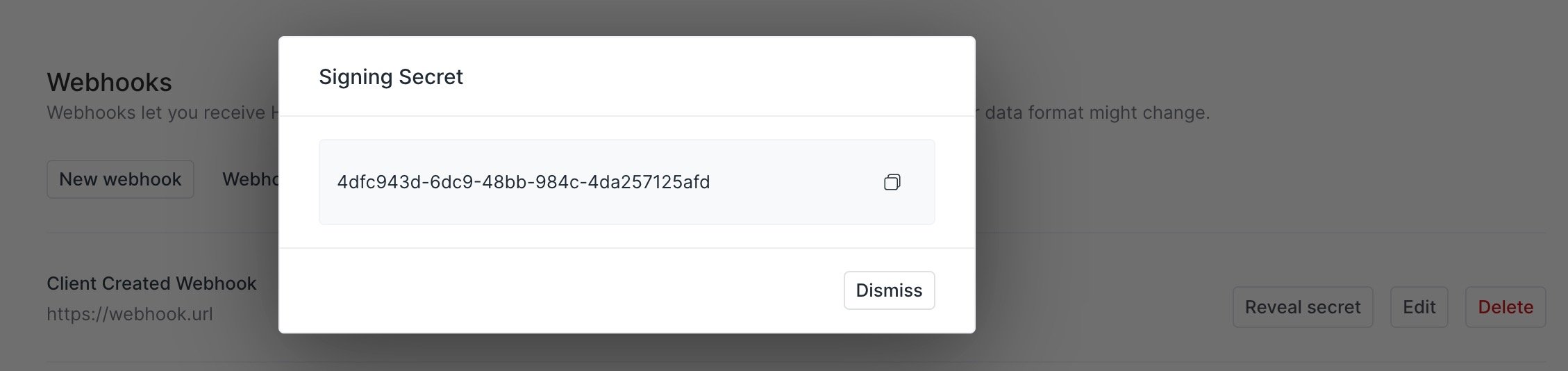
To verify the webhook, compute the signature from the request body using the webhook signing secret which can be revealed from the webhook menu.
## Payload
The payload for a webhook is an Event object with the following properties:
**eventType** `string`
The event type that triggered this webhook.
**data** `map`
A resource object associated with this webhook event.
**previousAttributes** `map`
For certain `*.updated` events, the event payload includes a `previousAttributes` map that lets you see what has changed about a resource. To learn more about the events that include `previousAttributes` see the Event details section below.
### Example webhook response
```json Example Webhook Response theme={null}
{
"eventType": "client.updated",
"data": {
"avatarImageUrl": "",
"companyId": "2edadd5c-17f3-4170-85f8-6976a94f52f5",
"createdAt": "2024-01-30T22:49:44.31465069Z",
"creationMethod": "internalUser",
"customFields": null,
"email": "allene+zc1@assembly.com",
"familyName": "ClientUpdate2",
"firstLoginDate": null,
"givenName": "Zapier",
"id": "029a2735-0332-464a-8ea6-22c9d3d5daa1",
"inviteUrl": "https://productiondemoallene.myassembly.com/u/_WWDzJtSg",
"lastLoginDate": null,
"object": "client",
"status": "notInvited"
}
}
```
## Response
Assembly expects to receive an HTTP `200` response code from your endpoint. We will retry to deliver the message 3 times if we don't receive one. To prevent time-outs, it is wise to configure your endpoints to send a `200` and then do any long-running processing on the data.
## Security
Assembly supports securing webhooks by including a signature in each event's `x-copilot-signature` header. This allows you to verify that the events were sent by Assembly and not by a third-party.
These headers will be updated to `x-assembly-signature` in the future, but please continue to use `x-copilot-signature` until an update is announced.
To verify the webhook, compute the signature from the request body using the webhook signing secret which can be revealed from the webhook menu.
 It's recommended to use raw request body content for the hashing as using JSON parsing may result in an error.
```javascript theme={null}
const crypto = require('crypto');
const signature = crypto.createHmac("sha256", SIGNING_SECRET).update(rawBody).digest("hex");
if (signature !== request.headers['x-copilot-signature']) {
throw "Invalid signature"
}
```
## Event details
### Client.updated
The `client.updated` webhook includes a `previousAttributes` property. Any updated properties will have a corresponding property in the `previousAttributes` property designating the previous values. This can be used to determine exactly which properties have been updated for a client. The `previousAttributes` in the example `client.updated` event below indicates that the client has a previous value of `tags: ["myTag1", "myTag2"]` in their custom fields. The data object indicates the tags as `["myTag1", "myTag2", "newtagupdate"]` which indicates that a new tag option was set.
```json Example theme={null}
{
"eventType": "client.updated",
"data": {
"avatarImageUrl": "",
"companyId": "d000c9b4-a323-4386-aeba-0e8d7a787138",
"createdAt": "2023-07-06T20:40:23.398161346Z",
"creationMethod": "internalUser",
"customFields": {
"tags": ["myTag1", "myTag2", "newtagupdate"]
},
"email": "sampleclient@assembly.com",
"familyName": "Client",
"firstLoginDate": "2024-03-14T20:07:58.087717952Z",
"givenName": "Sample",
"id": "6815623f-2661-4954-a42f-f68766dec711",
"inviteUrl": "https://samplecompany.myassembly.com/u/VW8VIQ94R",
"lastLoginDate": "2024-03-14T20:07:58.087717952Z",
"object": "client",
"status": "active",
"previousAttributes": {
"customFields": {
"tags": ["myTag1", "myTag2"]
}
}
}
}
```
It's recommended to use raw request body content for the hashing as using JSON parsing may result in an error.
```javascript theme={null}
const crypto = require('crypto');
const signature = crypto.createHmac("sha256", SIGNING_SECRET).update(rawBody).digest("hex");
if (signature !== request.headers['x-copilot-signature']) {
throw "Invalid signature"
}
```
## Event details
### Client.updated
The `client.updated` webhook includes a `previousAttributes` property. Any updated properties will have a corresponding property in the `previousAttributes` property designating the previous values. This can be used to determine exactly which properties have been updated for a client. The `previousAttributes` in the example `client.updated` event below indicates that the client has a previous value of `tags: ["myTag1", "myTag2"]` in their custom fields. The data object indicates the tags as `["myTag1", "myTag2", "newtagupdate"]` which indicates that a new tag option was set.
```json Example theme={null}
{
"eventType": "client.updated",
"data": {
"avatarImageUrl": "",
"companyId": "d000c9b4-a323-4386-aeba-0e8d7a787138",
"createdAt": "2023-07-06T20:40:23.398161346Z",
"creationMethod": "internalUser",
"customFields": {
"tags": ["myTag1", "myTag2", "newtagupdate"]
},
"email": "sampleclient@assembly.com",
"familyName": "Client",
"firstLoginDate": "2024-03-14T20:07:58.087717952Z",
"givenName": "Sample",
"id": "6815623f-2661-4954-a42f-f68766dec711",
"inviteUrl": "https://samplecompany.myassembly.com/u/VW8VIQ94R",
"lastLoginDate": "2024-03-14T20:07:58.087717952Z",
"object": "client",
"status": "active",
"previousAttributes": {
"customFields": {
"tags": ["myTag1", "myTag2"]
}
}
}
}
```